Preventing Database and Port Collisions with Concurrent AI Agents
Running parallel AI coding loops? Learn how to automate environment isolation, prevent database contamination, and eliminate network port deadlocks using Git Worktrees and global lifecycle hooks.
As of the day of writing this post, our relationship with AI coding tools has been sequential. We type a prompt and watch the AI generate code. If we need a feature written and a test suite built, we wait for the first task to finish before starting the next.
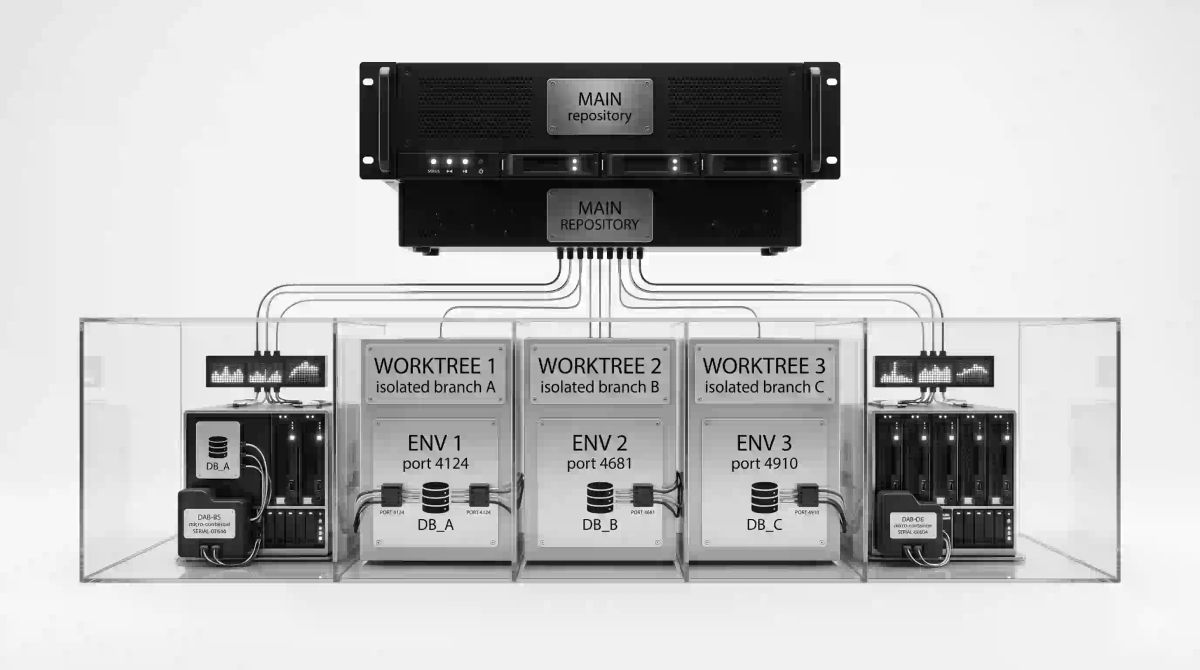
With terminal-native agents like Claude Code (using claude --worktree) and Cursor (using /multitask), a workflow can now execute concurrently. Instead of managing a single branch, you can spawn multiple autonomous sub-agents working concurrently on separate branches from your single repository root.
But the moment you scale up throughput, running concurrent agents causes your LDE to collapse due to environment collisions and shared resource conflicts.
Can we do something about overriding the sequential workflow without crashing the runtime?
Multi-Agent Architecture Failure Modes
Running parallel autonomous agents introduces runtime vulnerabilities across multiple layers of your local development stack. To prevent environmental corruption and context drift, your orchestration pipeline must explicitly account for the following failure modes.
| Problem Layer | Symptom | Structural Fix |
|---|---|---|
| Physical Layout | Code overwrites and file system lockups | Git Worktrees (claude --worktree) |
| Context Processing | Model forgets rules or experiences attention decay | Global settings.json + strict Exclude Patterns |
| Runtime Configuration | Network port deadlocks (EADDRINUSE) |
Dynamic Port Allocation shell hooks |
| Persistence Layer | Database contamination and test state pollution | Ephemeral, branch-named Docker containers |
| Dependency Assets | Missing modules and slow re-installations | Directory symlinking via script orchestration |
Git Worktrees Can Solve Partially
To run parallel agents without file-system conflicts, you cannot let them work in the same folder. If you do, they will overwrite each other's files and trigger race conditions on configuration lockfiles.
I personally know many engineers address this conflict by leveraging Git Worktrees as the foundational layer for physical file isolation.
A Git worktree creates an isolated working directory linked directly to your primary repository. Each worktree has its own checked-out branch and physical files on disk, but they all share the same underlying .git database.
                         ┌──► [feat/auth folder] ──────► Runs Agent A
                         │
[Core Git Repository] ───┼──► [refactor/api folder] ────► Runs Agent B
                         │
                         └──► [test/suite folder] ─────► Runs Agent C
When you type claude --worktree, the engine creates this isolated directory structure for you automatically.
Code Isolation is Not Environment Isolation
However, it is important to note that isolating your code files does not isolate your runtime environment. When Git worktrees separate your source text across different folders, those folders still run on the exact same machine, sharing the exact same local resources. The moment your sub-agents attempt to run tests or launch services simultaneously, your parallel workflow hits several breaking points.
- Broken configuration
When Claude Code spins up a new worktree directory, the sub-agent boots up inside a fresh checkout. Because it is a brand-new directory, the sub-agent may fail to find your project rules, model instructions, or custom tools defined in your root CLAUDE.md file or .claude folder. As a result, the sub-agent becomes blind to your style guides and project conventions.
⚠️ What to look out for: If your sub-agent suddenly starts writing code that violates your formatting rules or uses deprecated libraries, it means the agent has lost access to your root CLAUDE.md.- Database contamination
If your parallel sub-agents run local integration tests concurrently while pointing to a single development database file, they will corrupt each other's runtime data. Agent A's database migrations or test seeds will instantly wipe out the database state that Agent B relies on to pass its tests.
⚠️ What to look out for: Intermittent, random test failures. If a test suite passes locally on your main branch but fails inside an active agent worktree, look for shared state file leaks.
3. Network port deadlock
If Agent A launches a local test server to verify its build, it will occupy your default development port (like localhost:3000). When Agent B launches its own test server in its worktree, it will instantly crash with an EADDRINUSE port conflict.
⚠️ What to look out for: The AI misinterprets this network error as a code bug. Instead of changing the port, it will start rewriting application logic to fix a nonexistent structural flaw.
Steps to Automate Environment Isolation
To stop your parallel agents from breaking each other's test runs, you must automate environment isolation. You can test this by using a lightweight configuration file to map out distinct project environments for each worktree branch.
Prerequisites & Assumptions
Before implementing this setup, ensure your development environment meets these baselines:
- Your testing framework or runtime must support reading local environment variables from
.envor.env.localfiles on boot. - Your project must use an isolated local storage layer for development and testing, such as SQLite files or dockerized service containers that accept external configuration parameters.
- This specific automation script is built for POSIX-compliant shell environments (macOS, Linux, and WSL2 on Windows). If you are running standard Windows PowerShell, you will need to translate the bash hook script into a native
.ps1script.
Step 1: Create a Local Environment Matrix Template
Instead of using hardcoded global values in your .env file, create a dedicated environment template inside your main repository root. Name it .env.agent.template.
This template file provides the pattern our automated script will read. With this, app ports and database access boundaries will map dynamically to unique values:
# .env.agent.template
# Dynamically populated by the setup-worktree hook
PORT=$AGENT_DYNAMIC_PORT
DATABASE_URL="postgresql://postgres:secret@localhost:$DYNAMIC_DB_PORT/test_db"
NODE_ENV="test"
Listing 1: .env.agent.template — Environment variable matrix template located at the project root.
Step 2: Create the Orchestration Hook Script
When you define a custom WorktreeCreate hook in Claude Code, it completely overrides the internal Git layout automation. You must write a clean script that handles the physical directory creation, clones baseline assets like your node_modules/ or virtual environments to save time, and builds the environmental runtime values.
Create a file at ~/.claude/hooks/setup-worktree.sh and populate it with this orchestration engine:
#!/bin/bash
set -euo pipefail

# 1. Parse the JSON payload passed via stdin by Claude Code
INPUT=$(cat)
WORKTREE_NAME=$(echo "$INPUT" | jq -r '.name')

# Define target paths relative to project root
BASE_DIR=$(pwd)
TARGET_DIR="$BASE_DIR/.claude/worktrees/$WORKTREE_NAME"

echo "🔧 Orchestrating isolated infrastructure for: $WORKTREE_NAME" >&2

# 2. Execute physical file system isolation via Git Worktree
git worktree add "$TARGET_DIR" -b "worktree-$WORKTREE_NAME" >&2

# 3. Git Architecture Fix: Prevent Upstream Merge Drift
echo "🔄 Syncing worktree with upstream main..." >&2
cd "$TARGET_DIR"
git fetch origin main >/dev/null 2>&1 || true
git rebase origin/main >/dev/null 2>&1 || true
cd "$BASE_DIR"

# 4. Fix the Configuration Gap: Copy project instructions and context files
if [ -f "CLAUDE.md" ]; then
  cp "CLAUDE.md" "$TARGET_DIR/CLAUDE.md"
fi
if [ -d ".claude" ]; then
  mkdir -p "$TARGET_DIR/.claude"
  cp -R .claude/* "$TARGET_DIR/.claude/" 2>/dev/null || true
fi

# 5. Dependency Assets Fix: Concurrency-Safe Node Linkage via pnpm virtual store
if [ -f "pnpm-lock.yaml" ]; then
  echo "📦 Linking concurrency-safe pnpm store..." >&2
  cd "$TARGET_DIR"
  pnpm store path >/dev/null 2>&1 && pnpm install --store-dir="$BASE_DIR/.pnpm-store" --frozen-lockfile --ignore-scripts >&2 || true
  cd "$BASE_DIR"
elif [ -d "node_modules" ]; then
  ln -s "$BASE_DIR/node_modules" "$TARGET_DIR/node_modules"
fi

if [ -d ".venv" ]; then
  ln -s "$BASE_DIR/.venv" "$TARGET_DIR/.venv"
fi

# 6. Prevent Network Port Deadlocks & Database Contamination
RANDOM_PORT=$((4000 + RANDOM % 1000))
DYNAMIC_DB_PORT=$((5430 + RANDOM % 50))

echo "🐳 Provisioning isolated PostgreSQL container: db-$WORKTREE_NAME" >&2
docker run -d \
  --name "db-$WORKTREE_NAME" \
  -e POSTGRES_DB=test_db \
  -e POSTGRES_PASSWORD=secret \
  -p "$DYNAMIC_DB_PORT:5432" \
  postgres:16-alpine > /dev/null

# 7. Apply variables to the Environment Matrix Template
if [ -f ".env.agent.template" ]; then
  sed -e "s/\$AGENT_DYNAMIC_PORT/$RANDOM_PORT/g" \
      -e "s/\$DYNAMIC_DB_PORT/$DYNAMIC_DB_PORT/g" \
      .env.agent.template > "$TARGET_DIR/.env.local"
else
  cat << EOF > "$TARGET_DIR/.env.local"
PORT=$RANDOM_PORT
DATABASE_URL="postgresql://postgres:secret@localhost:$DYNAMIC_DB_PORT/test_db"
NODE_ENV="test"
EOF
fi

echo "✅ Environment isolated. App Port: $RANDOM_PORT | DB Port: $DYNAMIC_DB_PORT" >&2

# 8. Crucial: Output the final working directory as plain text to stdout
# This tells Claude Code exactly where to shift its context execution focus
echo "$TARGET_DIR"
Listing 2: ~/.claude/hooks/setup-worktree.sh — Bash orchestration script for provisioning isolated file systems, rebasing upstream history, and mapping runtime infrastructure.
Make your hook script executable before running it:
chmod +x ~/.claude/hooks/setup-worktree.shWhat the Script Tells the Orchestrator To Do and Why
- Git worktree creation (Section 2)
- Invoking
git worktree add "$TARGET_DIR" -b "worktree-$WORKTREE_NAME". - Why: In a standard workflow, running two concurrent AI agents inside a single project folder causes immediate race conditions; they overwrite each other’s active file changes and corrupt the Git staging index. When you invoke
git worktree add, you instruct Git to spin up an entirely separate physical directory on your machine ($TARGET_DIR) dedicated to that specific agent.
- Invoking
- Upstream rebase (Section 3)
- Executing
git fetch origin main && git rebase origin/maininside the target workspace instantly upon creation. - Why: Prevents Upstream Merge Drift. If Agent A changes an internal dependency schema on main while Agent B is testing in an isolated folder, Agent B will validate against stale history. Forcing a rebase ensures agents build against real-time code realities.
- Executing
- Concurrency-safe dependency mapping (Section 5)
- Creating a virtual pointer (
ln -s) to baseline caches or configuring an isolatedpnpmstore linkage. - Why: Git worktrees ignore untracked files or folders listed in
.gitignore. Forcing an agent to run raw installs on every setup loop drains active computing minutes and token budgets. Mapping hooks dependencies instantly without disk overhead, whilepnpmprevents file locking if two agents update dependencies simultaneously.
- Creating a virtual pointer (
- Dynamic port allocation (Section 6)
- Generating a random port between
4000–4999for the application, and5430–5479for the database listener. - Why: If multiple agents boot up on default ports like
3000, background test runs throw anEADDRINUSEsystem deadlock. AI models cannot easily distinguish port conflicts from code bugs and will ruin perfectly functional application logic attempting to bypass the network lock.
- Generating a random port between
- Branch-isolated Docker infrastructure (Section 6)
- Launching an ephemeral database instance (
db-$WORKTREE_NAME) tied strictly to the agent workspace payload. - Why: Sharing a single local test database leads to instant database contamination. Truncations or migrations executed by Agent A will drop or modify the identical data records Agent B needs to pass its active test assertions.
- Launching an ephemeral database instance (
Step 3: Configure Your Global Wrapper Settings
To fix the configuration gap and ensure every sub-agent inherits your core rules, you need to enforce workspace configurations at the user level.
Now, register your runtime automation hook inside your global system settings. Open your global user configurations file located at ~/.claude/settings.json and insert your execution boundaries:
{
  "project": {
    "trustChildDirectories": true,
    "inheritRootRules": true
  },
  "agentConfiguration": {
    "maxContextTokens": 45000,
    "excludePatterns": [
      "**/node_modules/**",
      "**/dist/**",
      "**/package-lock.json"
    ]
  },
  "hooks": {
    "WorktreeCreate": [
      {
        "type": "command",
        "command": "~/.claude/hooks/setup-worktree.sh"
      }
    ],
    "WorktreeRemove": [
      {
        "type": "command",
        "command": "bash -c 'INPUT=$(cat); WORKTREE_PATH=$(echo \"$INPUT\" | jq -r \".worktree_path\"); WORKTREE_NAME=$(basename \"$WORKTREE_PATH\"); docker rm -f \"db-$WORKTREE_NAME\" > /dev/null 2>&1 || true; git worktree remove \"$WORKTREE_PATH\" --force > /dev/null 2>&1 || true'"
      }
    ]
  }
}
Listing 3: ~/.claude/settings.json — Global user configuration file mapping the execution hooks and context exclusion parameters.
Always verify your excludePatterns. If you forget to block lockfiles or build outputs, your active token pool explodes. This causes the remote model's attention weights to decay, forcing critical code changes into the middle-context blindspot where the model completely overlooks them.Why are we doing this?
When you launch an autonomous agent, it first maps out the workspace. It runs discovery tools to understand your project layout. If you do not set hard boundaries, the agent will ingest massive text files like package-lock.json, minified JavaScript bundles in dist/, or deep dependency trees inside node_modules/.
This causes a severe problem known as attention decay. Large language models utilize a transformer architecture that exhibits a U-shaped attention curve. The model processes tokens at the very beginning and the very end of its input prompt with high accuracy. However, information buried in the middle of a massive context window drops into a blind spot.
To hard-block the agent's file discovery tools at the system layer, you can explicitly declare these under excludePatterns. You are explicitly telling its file-searching tools: "Do not look inside these folders, do not index these files, and act completely as if they do not exist."
Step 4: Protect Your Root Staging Rules
Because Step 1 introduces a template matrix file (.env.agent.template) and Step 2 generates a hidden local runtime target directory (.claude/worktrees/), you must ensure these automation assets do not leak into your shared repository history or trigger false file tracking flags for your background agents. The purpose is to add the target sub-agent worktree folders, the local temporary package storage paths, and the final evaluated environment configuration files directly into the repository-wide Git block list.
Open the primary .gitignore file located at your project's root directory and append these structural exclusions:
# Multi-Agent Orchestration Exclusions
.claude/worktrees/
.pnpm-store/
.env.local
Listing 4: .gitignore — Global repository block rules added to the root ignore file to preserve workspace integrity.
If you do not explicitly ignore the .claude/worktrees/ directory, your primary parent branch will see those sub-agent folders as massive, untracked modifications. Your main agent will waste context loops attempting to track, add, or fix code changes that are actually being executed independently by a parallel agent in a background pane. This simple exclusion preserves local repository sanity.
Step 5: Run Your Parallel Pipeline
Once your lifecycle parameters, ignore files and automation hooks are locked down, you can open distinct tabs inside your terminal multiplexer and execute concurrent workflows safely:
# Terminal Tab 1
claude -w "Refactor payments schema"
# Outputs: 🔧 Orchestrating environment... Port: 4124 | DB Port: 5432

# Terminal Tab 2
claude -w "Add user validation tests"
# Outputs: 🔧 Orchestrating environment... Port: 4681 | DB Port: 5439
Listing 5: Terminal Execution — Launching concurrent autonomous agents in separate terminal panes.
Because each sub-agent dynamically generates an isolated backend database container and boots up on its own unassigned local port, environmental friction is entirely eliminated. Your background agents can now execute verification commands with absolute clarity.
Advanced Mitigation Scenarios
- Upstream merge drift: If Agent A changes an internal authentication payload in one folder while Agent B updates a profile route in another, Agent B's tests might pass against stale code. Force your sub-agents to execute an upstream fetch and rebase (
git fetch origin main && git rebase origin/main) before initiating any validation runs. - Cache lockup: If multiple parallel agents run installations at the exact same millisecond, they will deadlock your shared machine caches (like
~/.npm/_cacache). Shift your ecosystem to pnpm (for Node) or uv (for Python), which are built to handle concurrent reads and writes natively without throwing file locks.
Conditions Under Which This Setup Will Break
While this script addresses the vast majority of local development workflows, watch out for two specific edge cases where these steps will fail.
1. Hardcoded port bindings in application code
If your application initialization code contains a hardcoded fallback block like const PORT = process.env.PORT || 3000; but your testing framework strips out external environment files by default, the agent will ignore the template value and revert straight to port 3000.
- Fix: Ensure your test script configuration explicitly runs an env-loading utility (like
dotenv) before initiating any server hooks.
2. Centralized Docker containers or shared cloud databases
If your integration tests connect to an external Docker container running on a fixed host mapping (e.g., localhost:5432 for a shared Postgres instance), your parallel agents will still pollute each other's data tables.
- Fix: For high-concurrency testing pipelines, update your script to spin up a lightweight, ephemerally isolated Docker container for each unique branch name, or switch to in-memory testing states during agent evaluation runs.
Summary
As parallel agent workflows become your default method for shipping software, managing token efficiency and environment isolation becomes a core requirement.
If your parallel development loops are stalling due to failing tests, merge conflicts, or environment crashes, your prompt wording is not the problem. Your environment architecture is. Stop rewriting your sentences and start isolating your local runtimes.