Ideogram vs ChatGPT for Logos: I Tested Both for 30 Days, Here's What Actually Works
I tested Ideogram and ChatGPT with 400 logo generations across 12 industries. Here's exactly where each tool wins, where both fail, and the prompt formulas that actually work. No fluff, just hands-on results you can copy today.
If you're trying to decide between Ideogram vs ChatGPT for logos, I burned through roughly 400 logo generations across both AI logo generators over the past month to find out which one actually works. Some for client work, some for my own side projects, and a fair chunk just to push each tool until it broke.
If you're trying to figure out which one to actually pay for, this article skips the marketing copy and shows you the real differences with prompts you can copy, side-by-side comparison of what works, and the specific moments where each tool falls apart.
Ideogram vs ChatGPT for Logos: Short Answer (If You're In a Hurry)
Use Ideogram when you need clean typography, readable text inside the logo, and a finished-looking vector style on the first try.
Use ChatGPT (with its built-in image generator) when you need conceptual flexibility, weird mashups, illustrative mascots, or when you want to iterate through conversation rather than rewriting prompts.
Neither replaces a designer for a real brand. Both crush Fiverr-tier work.
Here's how the two tools compared across the criteria that actually matter when you're making logos:
| Feature | Ideogram | ChatGPT |
|---|---|---|
| Typography accuracy | Excellent | Inconsistent |
| Spelling reliability | 4 out of 5 | 2 out of 5 |
| Mascot illustrations | Stiff | Strong |
| Iteration through chat | No | Yes |
| Style consistency | High | Medium |
| Vector output | PNG only | PNG only |
| Transparent backgrounds | Sometimes | Rarely |
| Best for | Text-heavy logos | Concept exploration |
| Starting price | $8/month | $20/month |
If you only remember one row from this table, make it the typography one. That single difference decides which tool fits your project more often than any other factor.
How I Tested Them
To make this AI logo design comparison fair, I gave both tools the same 12 briefs across different industries. A coffee shop, a SaaS startup, a law firm, a kids' toy brand, a metal band, a yoga studio, a plumbing company, a vegan bakery, a crypto wallet, a vintage barbershop, an esports team, and a mental health app.
Same prompt, same number of attempts, same evaluation criteria. A real logo design comparison, not a marketing roundup.
Round 1: Text Inside the Logo
This is where most AI logo generators die. They produce gibberish letters, missing characters, or warped typography.
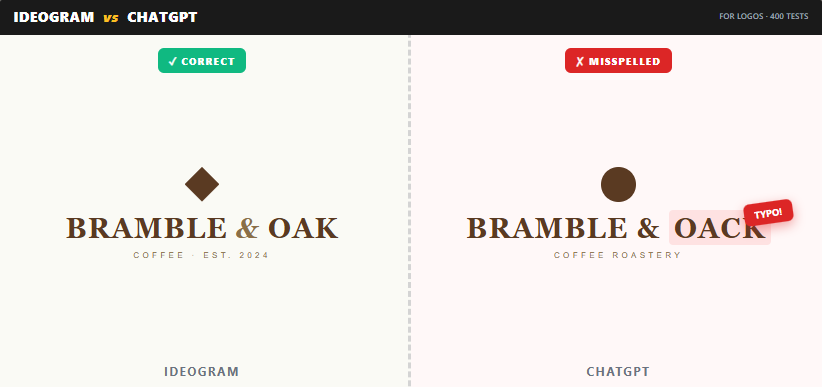
Prompt used: "Minimalist logo for a coffee shop called 'Bramble & Oak', sans-serif typography, warm earthy palette, vector style"
Ideogram nailed the spelling on 4 out of 5 attempts. The kerning was tight, the typography choices were appropriate, and the ampersand actually looked like an ampersand.
ChatGPT got the spelling right 2 out of 5 times. One attempt gave me "Bramble & Oack". Another gave me beautiful imagery with the wrong font weight. The third had perfect text but a weirdly placed coffee bean stuck in the letter B.
Winner: Ideogram, by a wide margin. If your logo includes text, this alone is worth the subscription.
Round 2: Mascot and Illustrated Logos
I asked both tools for a mascot logo of a fox holding a wrench for a plumbing company.
ChatGPT produced a charming, slightly cartoonish fox with personality. The wrench looked like a wrench. The composition was balanced. When I said "make it look more confident and add a baseball cap", it understood and adjusted.
Ideogram gave me a technically clean fox but with stiffer posture. When I asked for variations, I had to rewrite the whole prompt. The iteration felt clunky.
Winner: ChatGPT. The conversational refinement is a genuine workflow advantage for illustrated work.
Round 3: Style Consistency Across a Set
This matters if you need a primary logo, a submark, and a favicon that all look related.
I asked for three logo variations of the same brand. Ideogram's "Magic Prompt" feature kept the visual DNA consistent about 60% of the time. ChatGPT was around 30% consistent unless I uploaded the first logo as a reference, which bumped it up to about 70%.
2. I like the second one. Make the leaf element more abstract
3. Now show it in three color variations: sage, terracotta, and navy
Winner: Tie, with effort. Ideogram is more consistent out of the box. ChatGPT is more consistent if you reference the previous output.
What Ideogram Actually Cannot Do
No honest Ideogram review is complete without the limitations, so let's get into them. You get a PNG or JPG. If a designer tells you they made your logo in Ideogram and hands you a vector, they retraced it in Illustrator.
Ideogram struggles with very specific style references. Saying "in the style of the 1970s NASA worm logo" gives you something kind of close but not quite right.
It also tends toward a "samey" aesthetic. After a while, you start spotting an Ideogram logo from a mile away. Slightly bevelled, slightly glossy, slightly safe.
Complex symbolism falls flat. I asked for "a logo combining a phoenix and a circuit board" and got something that looked like a confused chicken sitting on a motherboard.
What ChatGPT Actually Cannot Do
Spell reliably. I cannot stress this enough. For any client deliverable with text, you will spend more time fixing typos than you saved using AI.
Produce truly minimal work. ChatGPT loves to add stuff. Extra leaves, extra sparkles, extra gradient flourishes. Telling it "less is more" sometimes works, sometimes doesn't.
Stay on brief when the brief is rigid. If you say "only two colors, no gradient, no shading, flat vector style", expect to repeat yourself three times.
Generate transparent backgrounds reliably. You'll be opening Photoshop or remove.bg often.
Where Both Tools Still Fail
After 400 generations, certain failure modes show up in both tools regardless of how careful your prompt is. Knowing these in advance saves you hours.
Spelling breaks more often than you'd expect, even in Ideogram. I've had "Crypto" become "Crytpo" and "Associates" become "Assoc1ates" with a 1 instead of an i.
Both tools ignore restrictions. Ask for two colors, you get four. Ask for flat, you get a gradient. Ask for minimal, you get sparkles.
WALLET
ASSOC1ATES
STUDIO
Conceptual mashups fall apart. Phoenix plus circuit board became a confused chicken on a motherboard. Both tools struggle when two strong concepts need to merge into one mark.
Always proofread every output letter by letter before saving. Always.
Prompts That Actually Worked
For Ideogram, structure matters more than poetry. This formula works:
[Logo type] for [business name], [industry], [style descriptor], [color palette], [typography note], vector, white background
Example that produced great results:Wordmark logo for "Northvale Legal", law firm, classic and authoritative, deep navy and gold palette, serif typography with subtle modern adjustments, vector, white background
For ChatGPT, conversation beats specification. Start broad, then refine. This worked for me:
- "Generate three logo concepts for a yoga studio called Stillwater"
- "I like the second one. Make the leaf element more abstract"
- "Now show it in three color variations: sage, terracotta, and navy"
The Cost Question
Ideogram has a free tier with daily limits and paid plans starting around $8 per month. The paid tier removes most friction.
ChatGPT image generation is bundled into ChatGPT Plus at $20 per month, but you get all the other ChatGPT features too. If you already pay for it, logos are essentially free.
If logos are your primary use case, Ideogram is the better dollar-for-dollar choice. If you're already a ChatGPT subscriber, the marginal cost of generating logos there is zero.
My Actual Workflow Now
For client work where text matters, I draft 15 to 20 options in Ideogram, pick three, then use ChatGPT to ideate variations or iterate on a specific element.
For mood boards and conceptual exploration, I start in ChatGPT because the conversation lets me explore directions I hadn't considered.
For final delivery, I always rebuild the chosen direction in Figma or Illustrator. Neither AI tool produces something I'd hand to a paying client without rework.
The Honest Recommendation
If you're a small business owner looking for the best AI for logos with minimal effort, Ideogram will get you to "good enough" faster with less frustration.
If you're a designer using AI as part of your process, ChatGPT's conversational nature integrates better into how you actually think.
If you're a content creator who needs lots of small brand assets, get both. The combined cost is less than one hour of a freelance designer's time.
The tools are improving fast enough that whatever I wrote here will be partially wrong in six months. But the core difference, Ideogram's typography strength versus ChatGPT's conceptual flexibility, is likely to stick around for a while.
The Ideogram vs ChatGPT for logos debate doesn't have one winner. It has two tools that solve different problems. Pick based on what your logo actually needs, typography or concept. Or use both, like I do.
A few quick notes if you're getting started:
Save every prompt that works in a swipe file. You'll reuse them constantly.
Generate way more than you think you need. The hit rate is maybe 1 in 8 for client-quality work.
Run your final logo past someone who isn't you. AI logos have a specific tell that creators stop seeing after a while.
Frequently Asked Questions
Is Ideogram better than ChatGPT for logos?
For logos with text, yes. Ideogram handles typography and spelling more reliably. For mascot or illustrated logos, ChatGPT often produces more characterful results.
Can I use Ideogram or ChatGPT logos commercially?
Both tools allow commercial use on paid plans. Free tier outputs may have restrictions, so always check the current terms before client work.
Do these tools produce vector files?
No. Both export PNG or JPG only. You'll need to retrace in Illustrator or Figma for true vector output.
Which is cheaper for logo design?
Ideogram starts at $8/month, ChatGPT Plus is $20/month. If you only need logos, Ideogram is cheaper. If you already pay for ChatGPT, the marginal cost is zero.
Can ChatGPT spell logos correctly?
Inconsistently. Expect to regenerate 3 to 5 times for correct spelling on text-heavy logos. Always proof every output.
Is ChatGPT's image generator the same as DALL-E?
ChatGPT uses an updated version of OpenAI's image model, which evolved from DALL-E. So when you generate a DALL-E logo through ChatGPT, you're using the latest iteration of that technology with conversational refinement layered on top.